Foto da capa do OnlyFans: como criar o banner e a imagem de perfil perfeitos
Domine a arte de criar fotos de capa e imagens de perfil atraentes do OnlyFans que convertem visitantes em assinantes pagantes.
Neste artigo
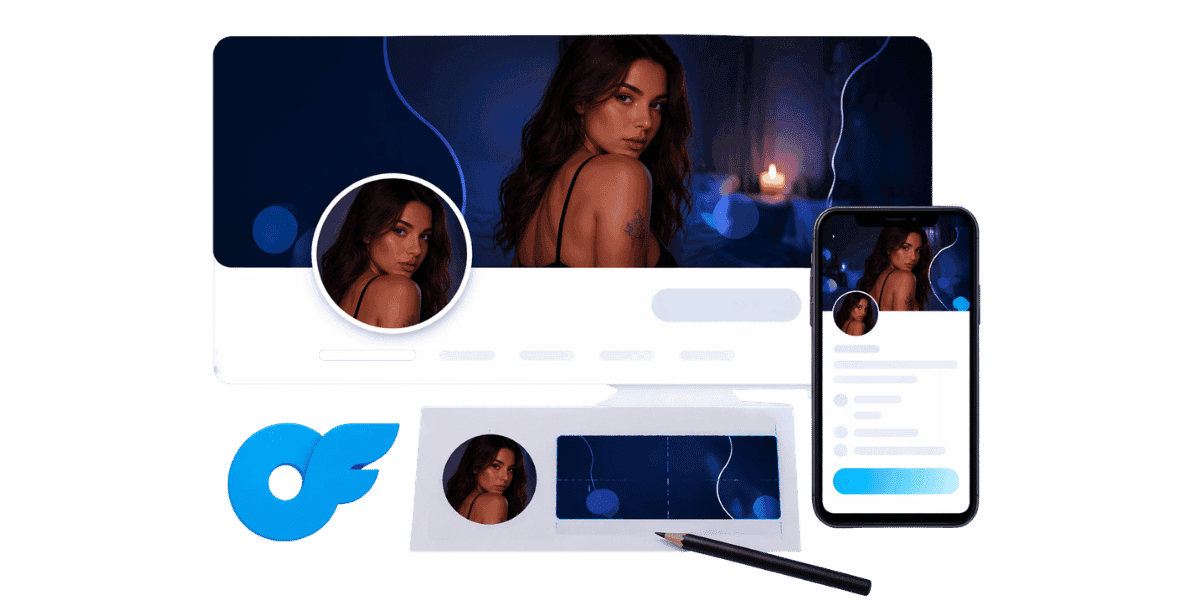
Sua foto de capa do OnlyFans é a primeira coisa que assinantes em potencial veem quando acessam seu perfil, tornando-a um dos recursos visuais mais importantes em todo o seu kit de ferramentas para criadores. Um banner e uma imagem de perfil bem projetados podem significar a diferença entre um visitante que passa e um novo assinante pagante. Acertar esses recursos visuais é essencial para estabelecer sua marca, comunicar seu nicho e construir a confiança de seu público desde o primeiro olhar.
Compreendendo as dimensões e requisitos da foto de capa do OnlyFans
Tamanho e resolução ideais do banner
As dimensões recomendadas para uma foto de capa OnlyFans são 1048 x 300 pixels para a imagem do banner. No entanto, fazer upload em uma resolução mais alta, como 2.096 x 600 pixels, garante que seu banner fique nítido em telas de alta densidade, como telas Retina. O formato do arquivo deve ser JPEG ou PNG, sendo que JPEG normalmente oferece melhor compactação para imagens fotográficas, enquanto PNG funciona melhor para gráficos com sobreposições de texto. Mantenha o tamanho do arquivo abaixo de 5 MB para garantir tempos de carregamento rápidos, pois imagens de carregamento lento podem fazer com que os visitantes saiam antes que seu perfil seja totalmente renderizado. Criadores que também usam seu banner para promoções sazonais se beneficiam do aprendizado agendando conteúdo no OnlyFans coordenar atualizações de banner com grandes lançamentos de conteúdo maximiza o impacto de ambos.
Especificações da imagem do perfil
A foto do seu perfil é exibida como um corte circular de 200 x 200 pixels, mas você deve enviar uma imagem quadrada de pelo menos 400 x 400 pixels para obter a melhor qualidade. Por causa do corte circular, certifique-se de que os elementos mais importantes da sua imagem estejam centralizados e não muito próximos das bordas. Esta imagem aparece em toda a plataforma em resultados de pesquisa, mensagens e feeds de recomendação, por isso precisa ser instantaneamente reconhecível mesmo em tamanhos muito pequenos. Escolha uma foto clara e bem iluminada ou um logotipo de marca distinto que possa ser lido bem como uma miniatura.
Zonas seguras e considerações móveis
Uma parcela significativa do tráfego OnlyFans vem de dispositivos móveis, onde a imagem do banner é cortada de forma diferente do que no desktop. Os 60% centrais do seu banner são a zona segura exibida de forma consistente em todos os dispositivos, portanto, mantenha seus elementos visuais mais importantes e qualquer texto dentro desta área. Teste seu banner em um telefone e em um computador antes de finalizá-lo. Muitos criadores perdem elementos importantes do design devido ao corte porque visualizam apenas em um tipo de dispositivo, o que pode prejudicar a aparência profissional que eles trabalharam arduamente para alcançar.
Projetando uma foto de capa que converte
Psicologia das Cores e Branding
As cores que você escolhe para sua foto de capa comunicam mais do que você imagina. Tons quentes como vermelhos e laranjas transmitem energia e paixão, enquanto tons frios como azuis e roxos sugerem sofisticação e calma. Seja qual for a paleta que você selecionar, a consistência é fundamental. Sua foto de capa, foto de perfil e quaisquer elementos biológicos devem compartilhar um esquema de cores coeso que seja associado à sua marca. Atenha-se a duas ou três cores primárias e use-as de forma consistente em todos os seus pontos de contato visual para criar reconhecimento imediato.
Tipografia e sobreposições de texto
Adicionar texto ao seu banner pode comunicar sua programação de postagem, nicho de conteúdo ou uma frase de chamariz atraente. Use fontes grandes e em negrito que permaneçam legíveis nas telas dos dispositivos móveis e limite-se a uma ou duas frases curtas. Evite sobrecarregar o banner com muitas informações, pois isso deve intrigar, e não sobrecarregar. Um slogan simples, como frequência de postagem ou especialidade de conteúdo, pode definir expectativas e atrair o público certo. Escolha fontes que correspondam à personalidade da sua marca, sejam fontes com serifa elegantes para um toque luxuoso ou sem serifa modernas para uma vibração limpa e acessível.
Composição Visual e Pontos Focais
Um excelente design de banner segue a regra dos terços, colocando o assunto principal ligeiramente descentralizado para criar interesse visual. Se estiver usando uma foto sua, posicione-se de lado e use o espaço restante para elementos de branding ou espaço negativo que deixe a imagem respirar. A direita Equipamento OnlyFans faz uma tremenda diferença na qualidade da foto do seu banner. Evite fundos ocupados que concorram com o seu assunto e considere usar um gradiente sutil ou efeito de desfoque para separar os elementos do primeiro plano do fundo.
Ferramentas e software para criação de banners OnlyFans
Ferramentas de design gratuitas para iniciantes
Canva é a ferramenta gratuita mais popular para criar banners OnlyFans, oferecendo centenas de modelos que você pode personalizar com suas próprias fotos e marca. Ele fornece funcionalidade de arrastar e soltar que não requer experiência em design, e você pode definir dimensões personalizadas para corresponder às especificações exatas do banner. Outras excelentes opções gratuitas incluem GIMP para edição de fotos mais avançada, Photopea como alternativa ao Photoshop baseada em navegador e PicMonkey para retoques rápidos. De acordo com Escola de Design do Canva, até mesmo os iniciantes podem criar gráficos com aparência profissional em menos de 30 minutos com o modelo certo.
Software de Design Profissional
Se você deseja controle máximo sobre o design do seu banner, ferramentas profissionais como Adobe Photoshop e Illustrator oferecem flexibilidade incomparável. Esses programas permitem trabalhar com camadas, modos de mesclagem avançados e controles tipográficos precisos que as ferramentas gratuitas simplesmente não conseguem igualar. O custo da assinatura mensal é um investimento que compensa se você atualizar regularmente seu banner para refletir promoções sazonais, novos temas de conteúdo ou anúncios especiais. Figma é outra excelente opção que combina recursos de nível profissional com uma interface colaborativa, e seu nível gratuito é generoso o suficiente para a maioria das necessidades dos criadores.
Contratar um Designer vs. DIY
Às vezes, o melhor investimento é contratar um designer profissional que entenda a plataforma OnlyFans e seus requisitos exclusivos. Designers freelancers em plataformas como Fiverr podem criar banners personalizados por apenas vinte a cinquenta dólares, e o resultado geralmente parece significativamente mais sofisticado do que uma tentativa DIY. Na hora de escolher seu nicho e identidade visual, revise Ideias de nicho OnlyFans primeiro garante que seu briefing de designer reflita uma direção de conteúdo com demanda comprovada do público. No entanto, se você gosta do processo criativo e deseja iterar com frequência no design do seu banner, aprender você mesmo as habilidades básicas de design fornece valor a longo prazo e tempos de resposta mais rápidos. Qualquer que seja o caminho de design que você escolher, proteja os recursos visuais que você cria proteção de marca on-line cobre o uso não autorizado das imagens da sua marca na web, não apenas no seu conteúdo.
Melhores práticas de imagem de perfil para impacto máximo
Escolhendo o estilo de foto certo
A imagem do seu perfil é o seu cartão de visita em toda a plataforma OnlyFans, por isso precisa funcionar muito em um espaço muito pequeno. As fotos de perfil mais eficazes apresentam expressões faciais claras, boa iluminação e um fundo simples que não distrai o assunto. Fotos de estilo de vida podem funcionar se comunicarem claramente o seu nicho, mas evite composições excessivamente complexas que ficam turvas no tamanho de uma miniatura. A iluminação natural e quente tende a ter um desempenho melhor do que a iluminação forte de estúdio para fotos de perfil, criando uma sensação convidativa e acessível que incentiva os visitantes a clicarem em seu perfil completo.
Consistência entre plataformas
A foto do seu perfil OnlyFans deve ser reconhecível pelos seguidores que descobrem você em outras plataformas de mídia social. Usar a mesma imagem ou uma imagem muito semelhante no Twitter, Instagram, Reddit e OnlyFans cria uma experiência de marca perfeita que gera confiança e torna você mais fácil de encontrar. Ao criar conteúdo para múltiplas plataformas, ter uma identidade visual consistente une tudo. Atualize sua foto de perfil simultaneamente em todas as plataformas ao mudar a marca e mantenha um arquivo mestre de suas imagens de perfil aprovadas para acesso rápido. Os criadores que constroem sua identidade visual em várias plataformas também devem reivindicar seu nome de usuário em todos os lugares e Gerador de nome de usuário OnlyFans ajuda a criar um identificador consistente e memorável antes de estabelecer sua marca.
Atualizações sazonais e promocionais
Atualizar a foto do seu perfil periodicamente mantém a aparência da sua página ativa e dá aos visitantes que retornam algo novo para notar. Muitos criadores de sucesso atualizam sua imagem de perfil mensalmente ou alinham as mudanças com feriados, temas sazonais ou lançamentos importantes de conteúdo. Pequenas atualizações, como adicionar uma borda festiva ou mudar sua roupa, podem sinalizar frescor sem confundir o público existente. Acompanhe a taxa de conversão de seus assinantes antes e depois das alterações na imagem do perfil para entender quais estilos repercutem mais em seu público-alvo e use esses dados para informar atualizações futuras.
Erros comuns na foto de capa a serem evitados
Imagens de baixa resolução e baixa qualidade
Nada afasta assinantes em potencial mais rápido do que uma foto de capa borrada, pixelizada ou mal iluminada. Sinaliza falta de profissionalismo e faz com que os visitantes questionem a qualidade do seu conteúdo real. Sempre fotografe ou obtenha imagens de banner na resolução mais alta possível e evite esticar imagens menores para caber nas dimensões do banner. Artefatos de compressão resultantes do salvamento de imagens em baixa qualidade são igualmente prejudiciais à sua aparência profissional. Invista tempo para acertar a qualidade técnica, pois seu banner é essencialmente uma propaganda do que os assinantes podem esperar do seu conteúdo pago.
Projetos superlotados e desordenados
A tentação de colocar o máximo de informações possível em seu banner é compreensível, mas quase sempre o tiro sai pela culatra. Muitos elementos de texto, imagens concorrentes e efeitos decorativos criam ruído visual que sobrecarrega os visitantes e dilui sua mensagem. Concentre-se em um visual principal e, no máximo, em uma mensagem principal. O espaço em branco é seu amigo porque dá aos olhos um lugar para descansar e chama a atenção para os elementos que mais importam. Revise seu banner no tamanho real de exibição em um telefone celular e, se algo estiver difícil de ler ou parecer apertado, simplifique implacavelmente até que o design respire.
Ignorando as diretrizes da plataforma e as políticas de conteúdo
OnlyFans tem diretrizes específicas sobre o que pode aparecer em banners e imagens de perfil, e violar essas regras pode resultar na remoção de suas imagens ou na sinalização de sua conta. Mantenha sua foto de capa e foto de perfil dentro dos termos de serviço da plataforma, evitando conteúdo explicitamente proibido nessas imagens públicas. Seu banner deve atrair sem ultrapassar limites, dando uma prévia de sua marca e estilo de conteúdo. Leia atentamente as diretrizes atuais antes de projetar suas imagens, pois essas regras podem mudar e o que era aceitável no ano passado pode não ser hoje. Os criadores que desejam uma visão geral completa do que OnlyFans permite devem ler o Termos de serviço do OnlyFans antes de finalizar qualquer design de banner.
Otimizando sua identidade visual para aumentar o número de assinantes
Teste A/B de seu banner e imagens de perfil
Criadores orientados por dados testam diferentes designs de banners e acompanham o impacto em sua taxa de assinatura. Tente exibir um banner por duas semanas e depois mudar para um design diferente nas próximas duas semanas, mantendo todas as outras variáveis constantes. Compare o crescimento do número de assinantes durante cada período para identificar qual abordagem visual tem melhor desempenho. Este método elimina suposições e permite melhorar continuamente sua estratégia visual com base em resultados reais. Mantenha uma planilha registrando as alterações do seu banner junto com os números de assinaturas diárias para identificar padrões ao longo do tempo.
Alinhando recursos visuais com sua estratégia de conteúdo
Sua foto de capa deve representar com precisão o tipo de conteúdo que os assinantes encontrarão atrás do acesso pago. Banners enganosos podem gerar cliques iniciais, mas levam a taxas de rotatividade mais altas à medida que assinantes desapontados cancelam. Se o seu nicho de conteúdo for fitness, seu banner deve apresentar imagens relacionadas ao fitness. Se você se concentra no conteúdo de estilo de vida, seu banner deve refletir essa estética. O alinhamento entre sua marca visual e o conteúdo real cria confiança, reduz solicitações de reembolso e atrai assinantes que estão genuinamente interessados no que você oferece, levando a uma melhor retenção e maior valor vitalício.
Aproveitando seu banner para promoções e anúncios
Sua foto de capa é um excelente local para promover ofertas por tempo limitado, lançamentos de conteúdo futuros ou anúncios especiais. Crie uma versão modelo do seu banner que inclua uma área designada para texto promocional que você pode atualizar rapidamente sem redesenhar a imagem inteira. Essa abordagem permite manter a consistência da marca enquanto mantém sua página dinâmica e atual. Atualizar seu banner antes de um grande lançamento de conteúdo ou período de desconto cria urgência e sinaliza aos visitantes recorrentes que algo novo está acontecendo, aumentando a probabilidade de eles se inscreverem ou assinarem novamente durante essa janela.
Criando sua identidade visual OnlyFans
Criar a foto de capa e a imagem de perfil perfeitas do OnlyFans é uma mistura de arte, estratégia e conhecimento técnico. Quando você acerta esses elementos, sua identidade visual funciona 24 horas por dia para atrair e converter novos assinantes. Aqui estão as principais lições a serem lembradas:
- Use as dimensões corretas (1048 x 300 para banners, 400 x 400 no mínimo para fotos de perfil) e carregue em resoluções mais altas para uma exibição nítida
- Mantenha os elementos mais importantes no centro, zona segura de 60% para exibição consistente em dispositivos móveis e computadores
- Mantenha uma paleta de cores e marca coesas em seu banner, foto de perfil e em todas as plataformas de mídia social
- Use ferramentas gratuitas como o Canva ou invista em software profissional para designs sofisticados e de alta qualidade
- Evite erros comuns, como imagens de baixa resolução, layouts desordenados e imagens enganosas
- Teste diferentes designs e acompanhe a conversão de assinantes para otimizar continuamente sua estratégia visual
Pronto para construir um perfil OnlyFans impressionante que atraia assinantes? Inscreva-se no Enforcity e obtenha as ferramentas e os insights necessários para expandir sua marca de criador com mais rapidez.
Proteja Seu Conteúdo
- Detecção de vazamentos 24/7
- Remoções DMCA automatizadas
- Proteção específica para OnlyFans
- Alertas de monitoramento em tempo real
Perguntas Frequentes
Não encontrou a resposta?

Emily
Estrategista de Conteúdo Digital
Emily é uma especialista em proteção de conteúdo digital com mais de 5 anos de experiência ajudando criadores a proteger seu trabalho online. Ela é especializada em aplicação de DMCA e estratégias de remoção específicas por plataforma.
Proteja Seu Conteúdo
- Detecção de vazamentos 24/7
- Remoções DMCA automatizadas
- Proteção específica para OnlyFans
- Alertas de monitoramento em tempo real
Artigos Relacionados

Usar um segundo celular desbloqueado para OnlyFans: por que e como
Usar um segundo celular desbloqueado para OnlyFans separa o trabalho de criador da vida pessoal. Aqui está como configurar, o que instalar e como manter seguro.
Ler Publicação
«Detected, opinion rejected» no OnlyFans: o que significa e como resolver
«Detected, opinion rejected» no OnlyFans explicado: o que o erro significa, o que dispara, como recorrer e como evitar que o mesmo conteúdo seja marcado de novo.
Ler Publicação
Melhor serviço online de proteção de conteúdo para criadores do OnlyFans
Melhor serviço online de proteção de conteúdo para OnlyFans: o que olhar, principais recursos, modelos de preço e como escolher o parceiro antipirataria certo em 2026.
Ler PublicaçãoRecursos Gratuitos

Protegendo Seu Bem-Estar Mental
Essenciais de saúde mental para criadores de conteúdo.

Manual Definitivo para Criadores OnlyFans
Recurso completo para todos os aspectos do sucesso no OnlyFans.

Como Proteger Seu Conteúdo 🌶️?
Como proteger seu conteúdo digital em múltiplas plataformas.

Como Se Manter Seguro como Criador?
Dicas essenciais de segurança para criadores de conteúdo.

O Que Todo Criador Precisa Saber Sobre Seus Direitos?
Noções básicas legais e direitos para criadores.

Como Proteger Sua Criatividade?
Um guia essencial para criadores do OnlyFans.

Glossário para Criadores de Conteúdo
Termos-chave que todo criador de conteúdo deve conhecer.

Checklist de Segurança de Conteúdo para Lucro Máximo
Checklist para proteger conteúdo e otimizar ganhos.

Como Parar Vazamentos Instantaneamente?
Proteja seu trabalho, assuma o controle e evite compartilhamento não autorizado em todas as plataformas instantaneamente.