Get Verified on OnlyFans: Complete Step-by-Step Verification Guide
Get verified on OnlyFans in minutes with our complete step-by-step guide.
In this article
Get verified on OnlyFans is a mandatory step before you can start posting content or earning money on the platform. OnlyFans requires all creators to complete identity verification to comply with legal regulations, prevent underage users, and ensure platform security. While the verification process typically takes just a few minutes, understanding requirements and avoiding common mistakes ensures quick approval so you can start building your creator business immediately.
Why OnlyFans Verification Is Required?
OnlyFans verification isn't optional, it's a mandatory legal requirement for all creators who want to monetize content on the platform. Understanding verification requirements before starting your OnlyFans journey ensures smooth account setup. According to Variety reporting on OnlyFans platform security, strict verification processes helped the platform process $6.63 billion in creator payments safely in 2023. The verification process serves several critical purposes:
Legal Compliance: Financial regulations require platforms processing payments to verify user identities to prevent money laundering, fraud, and illegal activity.
Age Verification: OnlyFans must confirm all creators are 18+ years old to comply with laws governing adult content platforms and financial transactions.
Account Security: Verification prevents impersonation, identity theft, and unauthorized account access that could compromise creator earnings and personal information.
Payment Processing: Payment processors require verified identities before transferring earnings to creators, ensuring money reaches the correct person.
According to OnlyFans verification standards, creators cannot post content, receive subscriptions, or access earnings until completing verification successfully.
OnlyFans Verification Requirements and Documents
To successfully get verified on OnlyFans, you need to provide specific documents and information. Review OnlyFans terms of service to ensure your documents meet platform compliance standards.
Accepted Government-Issued ID Documents:
- Passport (most commonly accepted, easiest to verify)
- Driver's license (front and back required)
- National ID card (must be government-issued with photo)
- Residence permit (in some jurisdictions)
Document Requirements:
- Must be current and not expired
- Must show your full legal name matching your bank account
- Must display clear photo and date of birth
- Must be in color, not black and white copies
- Must be clearly visible without glare or shadows
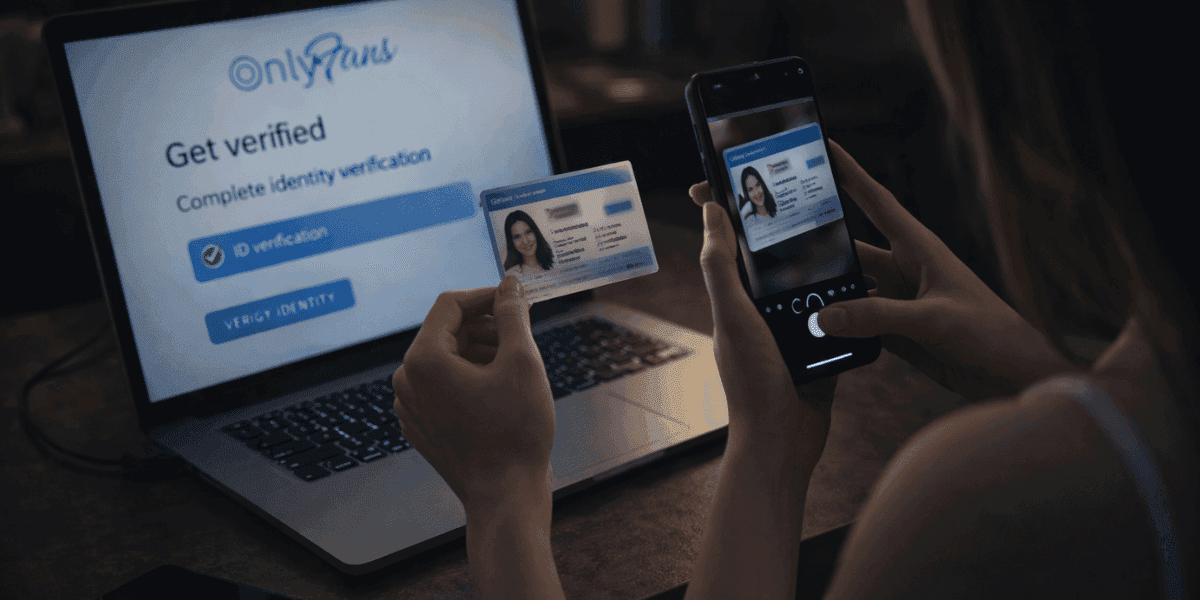
Selfie Verification: You'll need to take a live selfie holding your ID next to your face, proving you are the person shown on the identification document.
Banking Information: You'll need to provide bank account or payment method details matching the name on your ID for earnings withdrawal.
Step-by-Step OnlyFans Verification Process
Follow these steps to complete OnlyFans verification quickly and successfully:
Step 1: Create Your OnlyFans Account: Sign up at OnlyFans.com using a valid email address. Before you can post content, you'll be prompted to complete verification. Learn more about how to open an OnlyFans account.
Step 2: Navigate to Verification Section: Go to Settings → Account → Verification. Click "Start Verification" to begin the process.
Step 3: Select ID Document Type: Choose which government-issued ID you'll use (passport recommended for fastest approval).
Step 4: Upload ID Photos: Take clear, well-lit photos of your ID. For driver's license, photograph both front and back. Ensure all text and photos are sharp and readable.
Step 5: Take Verification Selfie: Hold your ID next to your face and take a selfie. Make sure your face and the ID photo are clearly visible in the same image.
Step 6: Submit for Review: Double-check all images are clear and readable before submitting.
Step 7: Wait for Approval: You'll receive an email when verification is approved or if additional information is needed.
Common Verification Errors and How to Fix Them
Many creators encounter verification errors that delay approval. Here are the most common issues and solutions:
Blurry or Unclear Photos: The most common rejection reason is poor photo quality where ID details can't be read.
- Fix: Use good lighting, hold camera steady, ensure all text is sharp and in focus. Avoid glare by not using flash directly on plastic IDs.
Expired ID Documents: OnlyFans rejects any identification that has passed its expiration date.
- Fix: Renew your ID before attempting verification. No exceptions are made for recently expired documents.
Selfie Doesn't Match ID Photo: Significant appearance changes (different hair color, facial hair, weight change) can cause verification failure.
- Fix: If your appearance changed significantly since your ID photo, consider updating your ID or providing additional verification documents.
Name Mismatch: The name on your ID must exactly match the name on your banking information.
- Fix: Use your legal name for OnlyFans account registration, even if you'll use a stage name for your public profile.
Screenshots Instead of Photos: OnlyFans rejects screenshots or digital copies of IDs.
- Fix: Photograph your physical ID card or passport, not a digital scan or screenshot.
What to Do If Your Verification Gets Rejected?
If your verification attempt gets rejected, don't panic—you can resubmit with corrections:
Review Rejection Reason: OnlyFans emails specific reasons for rejection. Read carefully to understand what needs correction.
Wait 24 Hours Before Resubmitting: OnlyFans recommends waiting before resubmitting to avoid multiple pending reviews that can delay approval.
Try Different ID Document: If your driver's license keeps getting rejected, try using your passport instead, which often has clearer photos.
Contact OnlyFans Support: If multiple attempts fail, contact support through the platform with your submission details for personalized assistance.
Consider Professional Photo: For persistent issues, visit a photo shop or use a professional camera in proper lighting to capture highest-quality ID and selfie images.
Verification typically succeeds within 1-3 attempts once you address the specific issues causing rejection.
Verification Security and Privacy Concerns
Many creators worry about privacy and security when submitting personal identification documents. Understanding OnlyFans security measures helps address these concerns:
Document Storage Security: OnlyFans encrypts verification documents and stores them securely in compliance with financial data protection regulations.
Employee Access: Only trained verification specialists access submitted documents, and access is logged and monitored for security audits.
Identity Protection: Your verification documents aren't publicly visible. OnlyFans protects creator identities from subscribers and other platform users.
Stage Names vs Legal Names: You must verify with your legal name for compliance, but you can use any stage name for your public creator profile.
Document Deletion: Creators can request document deletion if they close their accounts, though platforms must retain verification records for regulatory compliance periods.
Data Breach Protection: OnlyFans maintains cybersecurity insurance and encryption protocols to protect against unauthorized access to verification data.
While no platform guarantees absolute security, OnlyFans follows industry-standard practices for protecting sensitive verification information and complies with data protection regulations.
Understanding OnlyFans Creator Verification
OnlyFans verification provides credibility signals increasing subscriber trust and conversion:
Types of Verification: OnlyFans has two verification types: age verification and checkmark badge verification (optional, visible to subscribers indicating authenticity).
Age Verification Mandatory: All creators must complete OnlyFans age verification with government-issued ID proving you're 18+ before earning any income.
Checkmark Badge Purpose: Blue checkmark badges indicate verified authentic creators. Badges differentiate legitimate creators from impersonators and scammers.
Platform Trust Signal: Verified status appears prominently on creator profiles.
Verification Status Visibility: Verified badges appear on profiles, in search results, and across platform features.
Checkmark Badge Requirements and Benefits
Enforcity's checkmark badge requires active content protection membership and verified creator identity. The badge displays on profiles and promotional materials, deterring content theft while building subscriber trust.
Protected creators using OnlyFans DMCA badges report 40-60% fewer leaks and higher conversion rates.
The verification badge signals professional content protection, helping subscribers distinguish legitimate creators from accounts posting stolen content. Display the badge across all platforms to maximize its protective and marketing benefits.
Age and Identity Verification Process
Checkmark verification requires meeting OnlyFans specific criteria beyond basic age verification:
Account Age Requirement: Most platforms require accounts to exist 1-3 months before checkmark eligibility.
Engagement and Activity: Consistent content posting and subscriber engagement demonstrate active, legitimate creator accounts.
Account Compliance: Accounts must follow all OnlyFans policies with no violations, suspensions, or warnings.
Application Process: Request verification through account settings. OnlyFans evaluates eligibility based on account history, engagement, and compliance.
Verification Timeline and What to Expect
The technical process of verification requires understanding requirements and timeline:
Age Verification (Mandatory): Complete mandatory age verification first. Submit government-issued photo ID through OnlyFans secure upload. Verification typically processes 24-48 hours. Without age verification, you cannot earn income.
Document Requirements: Accepted documents include: passport, driver's license, national ID card, or age verification document. Document must be current, not expired, and clearly show full name and date of birth.
Photo Quality Standards: Submit clear, well-lit photos of ID front and back (if applicable). Document must be fully visible with legible information. Blurry or low-quality photos trigger rejection and resubmission requests.
Information Accuracy: Ensure legal name on OnlyFans account exactly matches ID document.
Verification Appeal Process: If verification denied, OnlyFans provides reason. Most denials result from: blurry photos, information mismatches, or unaccepted document type.
Privacy Protection: Submitted documents go through automated verification systems. OnlyFans doesn't display submitted documents publicly or share with third parties. Document information stays confidential.
Verification Boost and Performance Benefits
Verified status provides measurable performance benefits worth the verification effort:
Subscriber Confidence: Studies show verified creators receive 15-40% higher conversion from profile views to subscriptions. Verification badges dramatically boost trust signals.
Search and Discovery: Verified creators appear more prominently in search results and recommendation algorithms. Platform boosting verified accounts increases discoverability.
Premium Positioning: Verified status supports premium positioning justifying higher subscription prices. Verified creators command 10-25% price premium versus unverified competitors.
Content Protection: Verified status combined with preventing stolen OnlyFans content protects your creator reputation and earnings, ensuring subscribers receive authentic exclusive content.
Sponsorship Opportunities: Verified status sometimes enables sponsored content deals and brand partnerships unavailable to unverified creators.
Maintaining Verified Status Long-Term
Maintaining verified status requires ongoing compliance and account management:
Policy Compliance Vigilance: Verified status can be revoked for serious policy violations. Continue following OnlyFans content policies strictly even after verification approval.
Legitimate Subscriber Relationships: Maintaining authentic relationships with subscribers supports account health.
Account Security: Protect account against hacking. Compromised accounts could have verification revoked even if hack wasn't creator fault. Enable two-factor authentication and monitor unusual activity.
Performance Monitoring: Monitor account health using OnlyFans analytics to maintain verification status and identify potential compliance issues before they become problems.
Subscriber Communication: Respond to subscriber issues professionally. Poor customer service or misrepresentation can trigger complaints affecting verification status.
Evolving Policies: Stay current with OnlyFans policy changes. Policy violations are often unintentional due to lacking information.
Getting Verified Successfully: Combines meeting platform criteria, submitting proper documentation, demonstrating account legitimacy through engagement, and maintaining ongoing compliance.
Verified and ready to protect your status? Secure your verified account with Enforcity preventing content theft that could undermine your verified creator reputation.
Protect Your Content
- 24/7 leak detection
- Automated DMCA takedowns
- OnlyFans-specific protection
- Real-time monitoring alerts
Frequently Asked Questions
Couldn't find an answer?

Emily
Digital Content Strategist
Emily is a digital content protection specialist with over 5 years of experience helping creators safeguard their work online. She specializes in DMCA enforcement and platform-specific takedown strategies.
Protect Your Content
- 24/7 leak detection
- Automated DMCA takedowns
- OnlyFans-specific protection
- Real-time monitoring alerts
Related Articles

How to Withdraw Money from OnlyFans: A Human-Friendly Guide for Creators
Learn how to withdraw money from OnlyFans with this complete guide. Discover payout options, processing times, common issues, and how to keep your earnings secure.
Read Post
Wheelchair OnlyFans Success Guide
Discover how disabled creators thrive on OnlyFans, breaking stereotypes, inspiring communities, and promoting inclusivity. Learn Wheelchair OnlyFans niche details.
Read Post
What You Need to Know Before Starting OnlyFans: Essential Tips and Strategies
Thinking about joining OnlyFans? Discover What You Need to Know Before Starting OnlyFans? Essential tips, strategies, and insights to maximize your success, protect your content, and grow your fanbase effectively. Start your journey with confidence!
Read PostFree Resources

Protecting Your Mental Wellness
Mental health essentials for content creators.

Ultimate Handbook for OnlyFans Creators
Comprehensive resource for all aspects of OnlyFans success.

How to Safeguard Your 🌶️ Content?
How to safeguard your digital content across multiple platforms.

How to Stay Safe as a Creator?
Essential safety tips for content creators.

What Every Creator Needs to Know About Their Rights?
Legal basics and rights for creators.

How to Protect Your Creativity?
A must-have guide for OnlyFans creators.

Glossary for Content Creators
Key terms every content creator should know.

Content Security Checklist for Maximum Profit
Checklist for securing content and optimizing earnings.

How to Stop Leaks Instantly?
Protect your work, take control, and prevent unauthorized sharing across platforms instantly.